Optimizing SQL Queries

 I have found a nice article on Oracle query optimzation:
  D.1 Optimizing Single-Table Queries
To improve the performance of a query that selects rows of a table based on a specific column value, create an index on that column. For example, the following query performs better if the NAME column of the EMP table has an index.

SELECT * 
FROM EMP 
WHERE NAME = 'Smith'; 

D.2 Optimizing Join Queries

The following can improve the performance of a join query (a query with more than one table reference in the FROM clause).

D.2.1 Create an Index on the Join Column(s) of the Inner Table

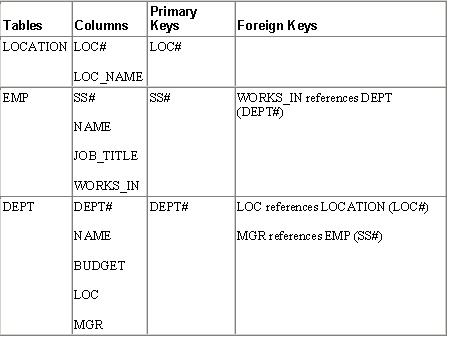
In the following example, the inner table of the join query is DEPT and the join column of DEPT is DEPT#. An index on DEPT.DEPT# improves the performance of the query. In this example, since DEPT# is the primary key of DEPT, an index is implicitly created for it. The optimizer will detect the presence of the index and decide to use DEPT as the inner table. In case there is also an index on EMP.WORKS_IN column the optimizer evaluates the cost of both orders of execution;DEPT followed by EMP (where EMP is the inner table) and EMP followed by DEPT (where DEPT is the inner table) and picks the least expensive execution plan.

SELECT e.SS#, e.NAME, d.BUDGET
FROM EMP e, DEPT d
WHERE e.WORKS_IN = DEPT.DEPT#
AND e.JOB_TITLE = 'Manager';

D.2.2 Bypassing the Query Optimizer

Normally optimizer picks the best execution plan, an optimal order of tables to be joined. In case the optimizer is not producing a good execution plan you can control the order of execution using the HINTS feature SQL. For more information see the Oracle9i Lite SQL Reference.
For example, if you want to select the name of each department along with the name of its manager, you can write the query in one of two ways. In the first example which follows, the hint /++ordered++/ says to do the join in the order the tables appear in the FROM clause with attempting to optimize the join order.


SELECT /++ordered++/ d.NAME, e.NAME
FROM DEPT d, EMP e
WHERE d.MGR = e.SS#

or:


SELECT /++ordered++/ d.NAME, e.NAME
FROM EMP e, DEPT d
WHERE d.MGR = e.SS#

Suppose that there are 10 departments and 1000 employees, and that the inner table in each query has an index on the join column. In the first query, the first table produces 10 qualifying rows (in this case, the whole table). In the second query, the first table produces 1000 qualifying rows. The first query will access the EMP table 10 times and scan the DEPT table once. The second query will scan the EMP table once but will access the DEPT table 1000 times. Therefore the first query will perform much better. As a rule of thumb, tables should be arranged from smallest effective number rows to largest effective number of rows. The effective row size of a table in a query is obtained by applying the logical conditions that are resolved entirely on that table.

In another example, consider a query to retrieve the social security numbers and names of employees in a given location, such as New York. According to the sample schema, the query would have three table references in the FROM clause. The three tables could be ordered in six different ways. Although the result is the same regardless of which order you choose, the performance could be quite different.

Suppose the effective row size of the LOCATION table is small, for example select count(*) from LOCATION where LOC_NAME = 'New York' is a small set. Based on the above rules, the LOCATION table should be the first table in the FROM clause. There should be an index on LOCATION.LOC_NAME. Since LOCATION must be joined with DEPT, DEPT should be the second table and there should be an index on the LOC column of DEPT. Similarly, the third table should be EMP and there should be an index on EMP#. You could write this query as:

SELECT /++ordered++/ e.SS#, e.NAME
FROM LOCATION l, DEPT d, EMP e
WHERE l.LOC_NAME = 'New York' AND
l.LOC# = d.LOC AND
d.DEPT# = e.WORKS_IN;

D.3 Optimizing with Order By and Group By Clauses

Various performance improvements have been made so that SELECT statements run faster and consume less memory cache. Group by and Order by clauses attempt to avoid sorting if a suitable index is available.

D.3.1 IN subquery conversion

Converts IN subquery to a join when the select list in the subquery is uniquely indexed.
For example, the following IN subquery statement is converted to its corresponding join statement. This assumes that c1 is the primary key of table t2:


SELECT c2 FROM t1 WHERE
c2 IN (SELECT c1 FROM t2);

becomes:


SELECT c2 FROM t1, t2 WHERE t1.c2 = t2.c1;

D.3.2 ORDER BY optimization with no GROUP BY

This eliminates the sorting step for an ORDER BY clause in a select statement if ALL of the following conditions are met:

  1. All ORDER BY columns are in ascending order or in descending order.
  2. Only columns appear in the ORDER BY clause. That is, no expressions are used in the ORDER BY clause.
  3. ORDER BY columns are a prefix of some base table index.
  4. The cost of accessing by the index is less than sorting the result set.

D.3.3 GROUP BY optimization with no ORDER BY

This eliminates the sorting step for the grouping operation if GROUP BY columns are the prefix of some base table index.

D.3.4 ORDER BY optimization with GROUP BY

When ORDER BY columns are the prefix of GROUP BY columns, and all columns are sorted in either ascending or in descending order, the sorting step for the query result is eliminated. If GROUP BY columns are the prefix of a base table index, the sorting step in the grouping operation is also eliminated.

D.3.5 Cache subquery results

If the optimizer determines that the number of rows returned by a subquery is small and the query is non-correlated, then the query result will be cached in memory for better performance. Currently the number of rows is set at 2000. For example:


select * from t1 where
t1.c1 = (select sum(salary)
from t2 where t2.deptno = 100);

Difference between MongoDB and RDBMS

Why RDBMS (SQL):

  • Frequent CRUD transactions for a limited similar type of data in GBs.
  • It’s good for structured data.
  • This kind of database is tightly structured with schema and perform slower (low latency) with huge growing data.
  • RDBMS performs faster for low amount of data ( in GBs).
  • SQL DBs- Oracle, MySQL, SQLServer etc.

Why MongoDB (No-SQL):

  • Write once and read many for unstructured data.
  • It’s faster than RDBMS for growing data on clusters/cloud in TB, PB etc.
  • If there is a requirement to not update DB frequently (not mission critical), dissimilar data , then go for this.
  • No SQL DBs- MongoDB, Cassandra, NeoJ, CouchDB, Hadoop, Cloudera, MapR etc.

In nutshell, if you have simple data without any complex relationship then why to choose complex RDBMS. Both are not replacement of each other, both have their own importance. I think it will be helpful to understand use cases of these two databases.

How to decide usage of Java Collections ???

ArrayList – orderd, fast iteration and fast random access.
LinkedList – orderd,fast insertion and deletion
HashSet – unsorted, unordered Set. no duplicates and you don’t care about order.
LinkedHashSet– orderd, Use this class instead of HashSet when you care about the iteration order.
TreeSet– Sorted.
HashMap– unsorted, unordered. don’t care about the order.
LinkedHashMap– maintains insertion order (or, optionally, access order). slower than HashMap for adding and removing elements, you can expect faster iteration with a LinkedHashMap.
TreeMap – Sorted. TreeMap lets you pass your own comparison rules in when you construct

5 scenarios where you can bet for EJB3

I have most of the times worked on spring based projects. Recently I got a chance to design business layer based on EJB 3.

Below are the observations based on my experience.Any architect may consider EJB 3 , for these aspects.

  1. JMS Consumers: When you need to develop JMS consumers: EJB supported MDB are simplest JMS consumers having annotated transaction support.
  2. Asynchronous Communication: In EJB 3.1, session beans support asynchronous method invocations. Bean methods annotated with @Asynchronous are invoked asynchronously. When a client invokes methods with the @Asynchronous annotation, the container immediately returns control to the client and invokes the method in a different thread. The method may return a future object to allow the client to check on the status of the method invocation, and retrieve result values that are asynchronously produced. EJB 3.1 supports this feature by using Future, which is part of standard java concurrency. Future represents the result of an asynchronous computation. It supports both model of communication:,
    1. Retrieve-result-later asynchronous methods having Future<?> return type.
    2. Fire-and-forget asynchronous methods having void return type
  3. Multi node deployment
  4. Distributed Application: EJB3 support for remoting and simple distributed transaction support makes spring first choice for distributed applications.
  5. State-full Behavior


You can achieve all the features with other frameworks as well, but one need to develop custom components or integrate other frameworks, while these features are embedded in EJB 3 and can be applied easily.

Aspects of Web application to be secured

To ensure security of a web application is an important requirement now days.  One needs to first do a vulnerability assessment.

For example:

  1. If there is file upload feature, Application can be vulnerable for uploading viruses.
  2. If there is form submission, Application can be vulnerable for html/js injection.
  3. If plain JDBC has been used, there can be threat for sql injection.

One practice can be to setup some design and development guidelines to ensure that application is secure to at least common vulnerabilities. Please read more at http://makesecurejava.blogspot.in/

Singleton Design Pattern in a clustered Environment !!!

When to Use:

We can use Singleton pattern while creating objects of thread pools, caches etc to avoid wasting resources. If you want to store global information like item price of products etc. It’s now a anti-pattern and you should avoid it by different substitutes.

Important Note: It has now become Anti-design pattern and we should avaoid by using follwoing techniques:

1. Dependency Injection

2. Using Factory design Pattern

3. Using Enum class etc. (Introduced in Java 1.5)


// Enum singleton - the preferred approach 

public enum MySingleton{
 INSTANCE Consolas, Monaco, monospace; 
}

Singleton Design Pattern in a clustered Environment [Source: http://www.techspot.co.in/2009/07/singleton-in-cluster.html%5D


In a multiple JVM’s environment, each of them will have their own copy of the singleton object which can lead to multiple issues specially in a clustered environment where the access to the resource needs to be restricted and synchronized.

To achieve clustering across multiple JVM’s, one can use multiple techniques (JMS, DB, Custom API, 3rd party tools), but each of them have an impact on the business logic.

  • Application server’s also provide some level of custom API’s to circumvent this problem.
  •  Terracotta, Oracle Coherence are good options. These work on the concept of providing an in memory replication of objects across JVMs in effect providing you singleton view  or making use of any of the cluster-aware cache provider’s like Swarm Cache or JBoss TreeCache should work as cache entries are singletons and clustering is built in.
  • Also, there is product called JGroups – which uses mulch-cast communication (TCP/UDP).  It allows to form a group and Applications (JVM’s) can participate and JGroups will send messages to everyone in the group so that they can be in sync.
  • JBoss has has Singleton Service ( based on MBeans) which is meant to solve this problem. Check here and here
  • Weblogic has the concept of Singleton Service – where only instance runs within the cluster and all clients will look up to the same instance.
  • WebSphere supports the concept of singleton across cluster in the WebSphere XD version of the application server as the partition facility – ObjectGrid