Featured

A Guide to digital Cities

Digital Cities are changing the way we live, work and play. We’ve seen a recent focus on the idea of creating sustainable digital cities, which address how technology can be used to improve quality of life while reducing greenhouse gas emissions. But what is a digital city? In this article, you’ll learn all about the technology behind them and what they’re capable of.

What is a Digital City?

A digital city is a city that uses digital technologies to improve the quality of life of its citizens. The goal of a digital city is to use technology to make the city more efficient, sustainable, and livable. There are many different types of digital city initiatives, but they all share the same goal of using technology to make the city a better place to live.

Digital cities use a variety of different technologies to achieve their goals. Some of these technologies include:

-Sensors: Sensors are used to collect data about the city. This data can be used to monitor traffic, pollution, and other aspects of the city.


-Smart grids: Smart grids are used to manage the flow of electricity in the city. Smart grids can help reduce blackouts and brownouts, and can also help save energy.


-Smart buildings: Smart buildings use sensors and other technologies to automate heating, cooling, and lighting. This can save energy and improve the comfort of building occupants.


-Intelligent transportation systems: Intelligent transportation systems are used to manage traffic flow in the city. These systems can help reduce congestion and improve the efficiency of the city’s transportation network.

The Platform Approach to build a Digital City

Digital cities are built on a platform approach that enables different applications and services to be delivered through a shared infrastructure. The key components of a digital city platform include:

-An open data portal that provides access to city data and information

-A set of APIs that allow different applications to interoperate

-A cloud-based infrastructure that delivers scalability and flexibility

The advantages of this approach include lower costs, faster deployment of new services, and the ability to create an ecosystem of innovation around the city platform.

Pillars of Digital City

1. Connected Infrastructure:

A smart city is one with a digital infrastructure that allows for the easy flow of information and communication between city systems and its residents. This infrastructure must be secure and reliable in order to protect the data of both the city and its citizens.

2. Intelligent Transportation:

A key pillar of smart cities is intelligent transportation. This includes everything from real-time traffic monitoring to self-driving vehicles. By using data and technology to improve the efficiency of transportation, cities can reduce congestion, pollution, and accidents.

3. Sustainable Energy:

Smart cities use data and technology to make their energy usage more sustainable. This can include things like renewable energy sources, energy storage, and smart grids. By using sustainable energy, cities can reduce their carbon footprint and save money in the long run.

4. Resilient Buildings:

Smart buildings are those that are designed to be resilient to extreme weather events and other emergencies. They use things like sensors, big data, and AI to monitor conditions inside and outside the building. This information can then be used to make necessary adjustments to keep people safe and comfortable during an emergency.

5. Healthy Citizens:

A healthy citizenry is essential for any city to function

What is the Technological Components of a Digital City?

Digital cities are increasingly becoming a reality as more and more municipalities adopt the technology needed to create them. But what exactly is a digital city, and what are the technological components that make it up?

A digital city is an urban area that uses digital technologies to improve the livability, workability, and sustainability of the city. This can include everything from using sensors to monitor traffic and air quality, to using big data to make better decisions about city planning, to providing free public Wi-Fi.

The technological components of a digital city vary depending on the specific goals and needs of the municipality, but there are some common themes. These include:

Sensors: Sensors are used to collect data about various aspects of the city, such as traffic patterns, air quality, and weather conditions. This data can be used to improve the efficiency of city operations and services.

-Big Data: Big data is a term used to describe the large amounts of data that are generated by sensors and other sources. This data can be used to identify trends and patterns, which can be used to make better decisions about city planning and service delivery.

-Crowdsensing: Crowdsensing is another simple way for cities to obtain data from their citizens. In this form of crowdsourcing, users voluntarily participate in a collaborative effort that helps make better use of the data.

-Open Data: Open data is a concept where governments release public data for use by their citizens, who can then create innovative applications and services based on that data. One of the most exciting aspects of open data is that it creates opportunities for citizen-to-citizen engagement and collaboration.-Internet of Things: The

-Public Wi-Fi: Public Wi-Fi is one of the simplest ways for a city to provide quick access to information and services for its citizens. Public Wi-Fi not only has social benefits, but can also be used by cities to , empower citizens with information.

Digital Democracy: Digital democracy describes the implementation of digital technology by citizens to increase their participation in the democratic process. Digital democracy encompasses both online activism for political causes and the use of social media for political action.

Conclusion

Digital cities are becoming increasingly popular as more and more people move to urban areas. These cities use technology to improve the quality of life for residents and make the city more efficient. If you’re interested in learning more about digital cities and the technology behind them, this article has provided a good introduction.

Featured

Architecture Governance: A Journey Through Three Companies

Introduction

No matter how big or small, every organization needs a way to ensure its technical decisions align with business goals. This is where Architecture Governance comes in—a structured approach to making sure technology choices support the company’s overall strategy. But governance doesn’t look the same everywhere.

Let’s take a journey through three different companies—BigCo, MidCo, and StartX—to see how each handles architecture governance in its own unique way.


1. What Is Architecture Governance, Really?

Before diving into their stories, let’s clear up a couple of key terms:

  1. Architecture – More than just system design. It includes technical decisions, system structure, and non-functional requirements like performance and security. It also involves guiding principles such as “Cloud-first” or “API-driven.”
  2. Governance – Refers to the policies and processes that guide these decisions. It’s about finding the right balance—giving teams autonomy while ensuring overall alignment. Good governance isn’t about putting up roadblocks; it’s about facilitating smart decisions.

2. BigCo: Governance in a Large Enterprise

The Setting

BigCo is a global corporation with multiple product lines and a strong compliance culture. Given its size and complexity, governance needs to be formal and structured.

How It Works

  1. Review Board – Meets weekly or bi-weekly, consisting of the Chief Architect, security and compliance leads, and product heads.
  2. Decision Records – Every major decision is documented in enterprise tools like Confluence, ensuring traceability.
  3. Guiding Principles – Heavy focus on security, compliance, and scalability. Example: “Mission-critical systems must have multi-region redundancy.”

Roles

  1. Global Architects – Define company-wide standards and enforce compliance.
  2. Local Architects – Adapt those standards to specific product needs.

Challenges

  1. Bureaucracy can slow down innovation.
  2. Balancing global standards with local team flexibility.

Turning Point

A major system overhaul at BigCo faced significant delays due to misalignment between regional teams. To address this, BigCo restructured its Architecture Review Board (ARB) to serve as an advisory body rather than a strict approval gate. The ARB introduced pre-implementation reviews, where architects collaborated with engineering teams during the early design phase to identify risks and ensure compliance with global architecture principles.


3. MidCo: Governance in a Fast-Growing Company

The Setting

MidCo is expanding quickly, managing moderate complexity. Agility is crucial, but they also need some level of standardization.

How It Works

  1. Review Board – A hybrid model with a central oversight team and regional chapters that meet monthly or per project.
  2. Decision Records – Uses streamlined templates for documentation—keeps records lightweight but useful.
  3. Guiding Principles – Balance between cost-effectiveness and speed. Example: “Build APIs for future flexibility.”

Roles

  1. Small Global Team – Part-time architects who define overarching standards.
  2. Local Architects – Handle multiple responsibilities, ensuring practicality.

Challenges

  1. Scaling governance as the company grows.
  2. Keeping consistency without slowing down feature releases.

Turning Point

Multiple offices built conflicting CI/CD pipelines, creating chaos. To fix this, MidCo introduced an Architecture Decision Record (ADR) outlining a standardized deployment process. The ADR documented best practices, key decisions, and areas where teams could still maintain flexibility. The result? No more redundant efforts and a more streamlined development process.


4. StartX: Governance in a Startup

The Setting

StartX is a fast-moving startup where speed is everything. Everyone wears multiple hats, and agility is the top priority.

How It Works

  1. Review Board – Practically non-existent. Decisions happen in sprints or quick stand-ups, usually led by the CTO or lead developers.
  2. Decision Records – Lightweight Markdown files stored in GitHub—sometimes documented after key decisions are made.
  3. Guiding Principles – Lean and cost-conscious. Example: “Use open-source wherever possible.”

Roles

  1. No formal global team – The CTO and senior developers handle architecture responsibilities on the fly.
  2. Everyone contributes ideas in real time.

Challenges

  1. Risk of accumulating technical debt due to rapid pivots.
  2. Lack of formal governance can result in missed learning opportunities.

Turning Point

A rushed release led to major performance problems. To prevent this from happening again, StartX introduced lightweight Architecture Decision Records (ADRs)—a small step that made a big difference. It helped the team capture knowledge and avoid repeating mistakes, all without slowing down their agile processes.


5. Key Takeaways for Every Organization

No matter your company’s size, these lessons apply across the board:

  1. Clarity in Architecture – Architecture is more than just writing code—it’s about making well-informed decisions that align with business goals.
  2. Governance as Facilitation – Governance should empower teams, not act as a roadblock.
  3. Adapt to Growth – Lighter processes work well for startups, but mature businesses need more structured governance.
  4. Value of ADRs – Documenting decisions helps teams learn from the past and ensures transparency.
  5. Evolve Over Time – As a company grows, its guiding principles should be revisited and refined.
  6. Regular Check-Ins Matter – Whether it’s weekly, monthly, or per project, teams should sync up to ensure alignment.
  7. Foster a Collaborative Culture – Governance works best when it’s inclusive—not something imposed from the top.

Conclusion

BigCo, MidCo, and StartX all approach architecture governance differently, but the core principles remain the same—aligning technology decisions with business goals, managing risks, and fostering innovation.

By adapting governance structures to fit an organization’s size and stage of growth—and by documenting decisions effectively—companies can stay on track, avoid costly mistakes, and build resilient systems.

Above all, governance is a living process—it should evolve as your products, teams, and business landscape change.

Scaling Your Architecture Org? Here’s How to Architect Roles & Governance for Growth

Introduction

Structuring an architecture practice is as much about process as it is about people. Whether you’re a 10-person startup or a 10,000-employee enterprise, the blend of architect roles and the governance you wrap around them will determine how gracefully you scale. Based on hard-won lessons from the field, this article lays out a practical playbook for aligning Enterprise Architect (EA), Solution Architect (SA) and Team Architect (TA) roles to your company’s stage of growth, while keeping governance lightweight enough not to smother innovation.


1. Startups (1 – 50 employees) — Survive through Agility

In the earliest days, titles matter less than velocity. Your CTO or lead developer is typically a player-coach: setting the long-term vision (EA), shaping the initial system design (SA) and writing code alongside the team (TA).

Governance must be just enough to prevent accidental complexity:

  • Architecture Decision Records (ADRs). One-pager “why” documents for irreversible calls—e.g., “Why we chose serverless.”
  • Ad-hoc Architecture Review Board (ARB). Five-minute check-ins during daily stand-ups.
  • Guiding Principles. Formalize three to five north-stars such as “Speed over perfection” or “Bias for managed services.”

Culture mantra: “Everyone codes, everyone architects.”
Pro-tip: Hire T-shaped engineers who can wear multiple hats and learn on the fly.


2. Mid-Scale (50 – 500 employees) — Balance Autonomy with Alignment

As product–market fit solidifies, entropy creeps in. You now need dedicated Solution Architects who own cross-team initiatives—think “migrating to microservices” or “lifting to Kubernetes.” Critical teams (DevOps, data, security) benefit from embedded Team Architects who stay close to code yet guard the technical runway. A small central architecture team begins to emerge, acting as proto-Enterprise Architects that steward standards and roadmaps.

Governance grows up—but stays nimble:

  • ADRs with peer review. Use a template and require sign-off when a decision affects two or more teams.
  • Monthly ARB. SAs, security and product leads hash out cross-cutting concerns; decisions are logged in the wiki.
  • Guiding Principles 2.0. Shift emphasis to scalability, standardization and risk mitigation; reinforce via workshops.
  • Tech Radar. Track approved, trial and deprecated tools; refresh quarterly.

Tools that scale: Lucidchart for diagrams, lightweight OKRs to align architecture outcomes with business goals.
Pro-tip: Coach SAs to be diplomats—equally fluent in business goals and engineering realities.


3. Large Enterprises (500 + employees) — Global Coherence without Stifling Innovation

When org charts sprawl across continents, you need clear architectural layers:

  • Enterprise Architects set org-wide standards, roadmaps and KPIs.
  • Solution Architects orchestrate large, cross-business-unit programs—modernizing an ERP, for instance.
  • Team Architects sit inside product teams, translating guardrails into working code.
  • Domain Architects (cloud, data, security) provide deep subject-matter muscle and advise EAs.

Governance becomes a genuine operating system:

  • ADRs integrated with tooling (LeanIX, ServiceNow) for enterprise-grade traceability.
  • Weekly ARB featuring EAs, Domain Architects, compliance and legal—decisions tie back to risk registers.
  • Enterprise Guiding Principles. Hard-wired into audit checklists, onboarding and annual training.
  • Central Tech Radar. Lifecycle status (adopt, trial, assess, sunset) plus deprecation timelines to prevent zombie tech.

Culture mantra: “Think globally, act locally.” Empower TAs to adapt standards to context.
Pro-tip: Rotate seasoned SAs into EA roles to bridge strategy and execution—and keep ivory towers at bay.


The Evolution of Architect Roles

  1. Startup: No formal roles—architects are player-coaches.
  2. Mid-Scale: Specialize SAs and TAs to tame complexity.
  3. Enterprise: Layer EAs → SAs → TAs for sustainable scale.

The Golden Rule

  • EAs own the “Why” (strategy).
  • SAs own the “What” (solution design).
  • TAs own the “How” (execution).

Does Kafka really preserve ordering in a partition?

It’s a general belief that Kafka guarantees the ordering within a partition. Same is claimed in official Kafka documentation. Below are the excerpts from Kafka documentation.

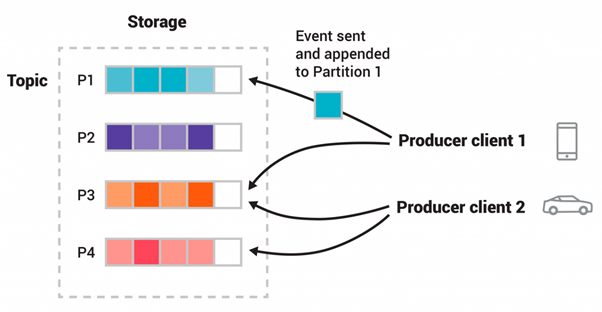
Topics are partitioned, meaning a topic is spread over a number of “buckets” located on different Kafka brokers. This distributed placement of your data is very important for scalability because it allows client applications to both read and write the data from/to many brokers at the same time. When a new event is published to a topic, it is actually appended to one of the topic’s partitions. Events with the same event key (e.g., a customer or vehicle ID) are written to the same partition, and Kafka guarantees that any consumer of a given topic-partition will always read that partition’s events in exactly the same order as they were written.

Figure: This example topic has four partitions P1–P4. Two different producer clients are publishing, independently from each other, new events to the topic by writing events over the network to the topic’s partitions. Events with the same key (denoted by their color in the figure) are written to the same partition. Note that both producers can write to the same partition if appropriate.

https://kafka.apache.org/intro.html#intro_topics

So, where is the problem?

If you run the Kafka with default configurations, there can be a scenario when a message, although produced earlier yet appended after the message produced later.

No, I don’t want to break your heart, but its the bitter truth. Let me unravel this mystery.

Default value for producer’s retries is Integer.MAX_VALUE, and the delivery timeout is 2 minutes. If a message is not acknowledged, producer will keep sending it again and again, unless it succeeds, retries are exhausted or timeout period expires.

There is another configuration “max.in.flight.requests.per.connection”. It is the maximum number of unacknowledged requests, the client will send on a single connection before blocking. Default value of this property is 5.

So if a message is unacknowledged, it will be retried. If messages sent after the failed message are acknowledged before this message succeeds in retry, then those messages will appear before in order i.e. reordering of the messages (et tu Kafka……).

Don’t get disheartened, although by default Kafka doesn’t preserve the order, yet a small tweak in the configurations would restore the guaranteed ordering and your faith in humanity.

You need to set either of following two configurations to ensure the ordering.

  1. max.in.flight.requests.per.connection =1

or

  1. enable.idempotence=true

Sigh!! After all Kafka is a loyal friend, Happy Messaging!!

Microservices Assessment Framework

Mohit is an experienced enterprise architect and blogger. He has consulted various organizations and trained multiple teams to enable them to successfully adopt and improve Microservices architecture.

Based on his experience,  Mohit is working on a Microservices assessment framework for following three objectives.

  1. Readiness – Access whether your organization is ready to adopt Microservices?
  2. Fitness – Access whether Microservices is good fit for your organization?
  3. Review– Evaluate your (Microservices) Architecture and identity area of improvements.


blog

Proposed framework access Organization, processes and  base architecture.  You may find various questionnaires accessing following items.

  1. Business Drivers – Determine whether you have clear and valid business drivers for MSA.
  2. Development Velocity – Determine whether you can take benefits from MSA.
  3. Base Architecture – Determine whatever base architeure has all the required
  4. Infrastructure – Determine whether your organization has developer and MSA friendly infrastructure.
  5. Organization Structure – Determine whether you have correct organization structure required for MSA
  6. Processes – Determine whether you have correct organization processes required for MSA
  7. Individual Service Design – Determine capability of each service design.

Stay tuned for More Information. Please contact us for learning more.

Go back

Your message has been sent

Warning
Warning
Warning
Warning

Warning.


Why Is Swagger JSON Better Than Swagger Java Client?

The Swagger Java-Based Client Using Java Annotations on the Controller layer

Pros and Cons

  • It’s the old way of creating web-based REST API documents through the Swagger Java library.
  • It’s easy for Java developers to code.
  • All API description of endpoints will be added in the Java annotations parameters.
  • Swagger API dependency has to be added to the Maven configuration file POM.xml.
  • It creates overhead on the performance because of extra processing time for creating Swagger GUI files (CSS, HTML, JS etc). Also, parsing the annotation logic on the controller classes creates overhead on the performance, as well. It makes the build a little heavy to deploy on microservices, where build size should be smaller.
  • The code looks dirty because the extra code has to be added to the Spring MVC Controller classes through the Spring annotations. Sometimes, if the description of the API contract is too long, then it makes code unreadable and maintainable.
  • Any change in an API contract requires Java to build changes and re-deployment, even if it’s only simple text changes, like API definition text.
  • The biggest challenge is to share with the clients/QA/BA teams before the actual development and to make frequent amendments. The service consumers may change their requirements frequently. Then, it’s very difficult to make these changes in code and create the Swagger GUI HTML pages by redeploying and sharing the updated Swagger dashboard on the actual deployed dev/QA env.

2. Swagger JSON File Can be Written Separately and Provide Browser-Based GUI

Pros and Cons

  • In this latest approach, all of the above challenges with Java-based client solution have been solved.
  • The developer initially creates a JSON file, shares, and agrees with the service consumer and stakeholders. They will get signed off after many amendments —no code change and re-deployment are required.
  • The code will be cleaner, readable, and maintainable.
  • There is no extra overhead for file creation and processing, performance is better, and the code is more lightweight for microservices, etc.
  • There is no code dependency for any API contract changes.
  • Swagger JSON file resides in the project binaries (inside src/main/resources/swagger_api_doc.json). We can deploy Swagger on one server and can switch to an environment like this.

Note

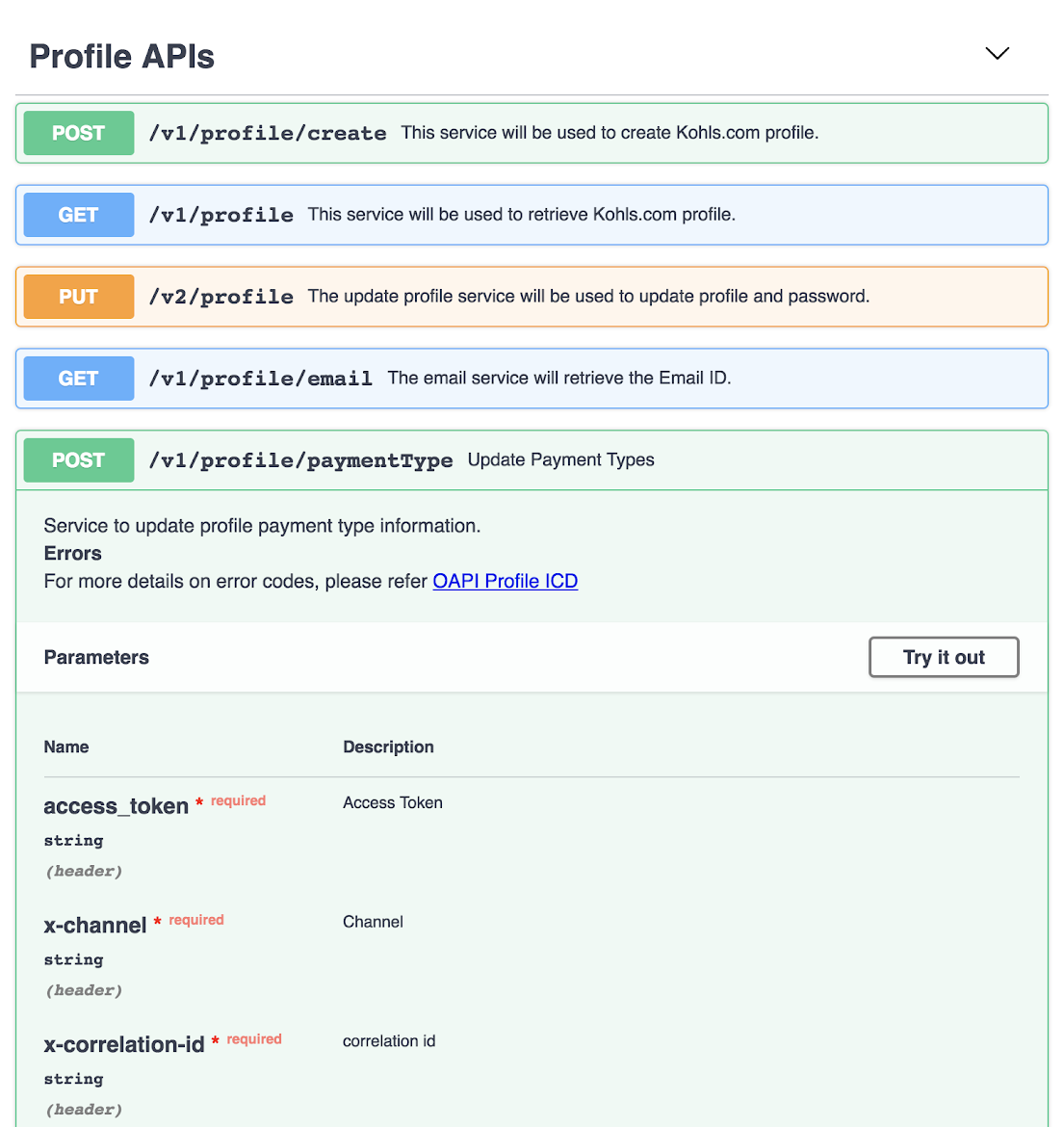
You can copy and paste swagger_api_doc.json JSON file content on https://editor.swagger.io/. It will help you modify content and create an HTML page like the following.  Swagger GUI will provide the web-based interface like Postman.

10 Challenges of Microservices and Solutions – Tips & Tricks

I am cloud API developer and architect and currently working on Google’s GCP based microservices for a large retail client of USA.

Transitioning/implementing to microservices creates significant challenges for organizations. I have identified these challenges and solution based on my real exposure of microservices on PROD.

I am writing this white paper in June 2018. At this time, Microservices architecture is not matured enough to address completely all the existing challenges, however open source communities and IT product companies are trying to address all these open issues. All new researches on this topics are based on the finding solutions to the new challenges.

These are the major 10 challenges of microservices architecture and proposed solutions-

1. Data Synchronization – We have event sourcing architecture to address this issue using the async messaging platform. Saga design pattern can address this challenge.
2. Security – API Gateway can solve these challenges. Kong is very popular open source which is being used by many companies on the production system. The custom solution can also be developed for API security using JWT token, Spring Security, and Netflix Zuul/ Zuul2. There are enterprise solutions are also available like Apigee, Okta ( 2 step authentication). Openshift for public cloud security for its top features of RedHat Linux Kernal based security and namespace-based app to app security.
3. Versioning – It will be taken care by API registry and discovery APIs using dynamic Swagger API, which can be updated dynamically and shared with the consumers on the server.
4. Discovery – It will be addressed by API discovery tools like Kubernetes, OpenShift. It can also be done using Netflix Eureka at the code level. However, doing with the orchestration layer will be better and that can be managed by these tools rather doing and maintaining thru code and configuration.

5. Data Staleness – The database should be always updated to give recent data, API will fetch data from the recent and updated database. A timestamp entry can also be added with each record in the database to check and verify the recent data. Caching can be used and customized with an acceptable eviction policy based on the business requirement.
6. Debugging and Logging – There are multiple solutions- Externalised logging can be used by pushing log messages to an async messaging platform like Kafka, Google PubSub etc. A correlation ID can be provided by the client in the header to REST APIs to track the relevant logs across all the pods/docker containers. Also, local debugging can be done individually of each microservice using IDE or checking the logs.
7. Testing– This issue can be addressed using unit testing by mocking REST APIs, Mocking integrated/dependent APIs which are not available for testing using WireMock, BDD Cucumber integration testing, performance testing using Jmeter and any good profiling tool like Jprofiler, DynaTrace, YourToolKit, VisualVM etc.
8. Monitoring – Monitoring can be done using Open source tools Prometheus in the combination of Grafana by creating Gauge and matrices, Kubernetes/OpensShift, Influx DB, Apigee, the combination of Graphana and Graphite.
9. DevOps Support – Microservices deployment and support related challenges can be addressed using state on the art DevOps tools GCP Kubernetes, OpenShift with Jenkin.
10. Fault Tolerance – Netflix Hystrix can be used to break the circuit if there is no response from the API for the given SLA/ETA.